Unzipping DMF Data Package Files Using Azure Function App C#


In this blog, we will walk through the process of unzipping a file received from D365 FO DMF (Data Management Framework) data packages using an Azure Function App.

Below are the detailed steps to implement this solution.


🔹 Step 1: Access Azure Portal

  1. Navigate to the Microsoft Azure Portal

  2. Sign in with your credentials

  3. Ensure you have the required permissions to create resources (Function App, Storage Account, etc.)


🔹 Step 2: Create a Function App

  1. In the Azure Portal, click on “Create a resource”

  2. Search for Function App and click Create

  3. Provide the required details:

    • Subscription: Select your subscription

    • Resource Group: Create or use existing

    • Function App Name: e.g., UnZipFileProcesser

    • Runtime Stack: .NET / Node.js (depending on your preference)

    • Region: Choose closest region

  4. Under Hosting:

    • Select or create a Storage Account

  5. Review + Create → Click Create

✅ Once deployed, your Function App will be ready to host your code.


🔹 Step 3: Create Azure Function Project in Visual Studio

  1. Open Microsoft Visual Studio

  2. Click on Create a new project

  3. Select Azure Functions

  4. Click Next

Configure Project:

  • Project Name: UnZipFileProcesser

  • Location: Choose your workspace

  • Click Create

Now your project will look like this and install all the packages that are showing in the project.


🔹 Step 4: Implement Unzip Logic

Inside your function, write logic to:

  1. Read the zipped file from Blob Storage

  2. Extract contents

  3. Upload extracted files to another container (e.g., output-container)

Sample C# Code Snippet:


using Azure.Storage.Blobs;
using Azure.Storage.Blobs.Specialized;
using Microsoft.AspNetCore.Http;
using Microsoft.AspNetCore.Mvc;
using Microsoft.Azure.Functions.Worker;
using Microsoft.Azure.WebJobs;
using Microsoft.Extensions.Logging;
using Newtonsoft.Json;
using System;
using System.IO;
using System.IO.Compression;
using System.Net;

namespace UnZipFileProcesser
{
    public class UnzipFile
    {

        [Function("UnzipFile")]
        public static async Task<IActionResult> Run(
        [HttpTrigger(AuthorizationLevel.Function, "post")] HttpRequest req, ILogger _logger)
        {
            try
            {
                // Inputs from Logic App / request
                string requestBody = await new StreamReader(req.Body).ReadToEndAsync();
                dynamic data = JsonConvert.DeserializeObject(requestBody);

                string sourceContainer = data?.sourceContainer;
                string destinationContainer = data?.destinationContainer;
                string sourcePath = data?.sourcePath;// Pass file name + Path
                string dataFileName = data?.dataFileName;
                string destinationPath = data?.destinationPath;
                string filename = data?.filename;
                string connectionString = data?.connectionString;

                var blobServiceClient = new BlobServiceClient(connectionString);

                var sourceContainerClient = blobServiceClient.GetBlobContainerClient(sourceContainer);
                var destContainerClient = blobServiceClient.GetBlobContainerClient(destinationContainer);

                await destContainerClient.CreateIfNotExistsAsync();

                var sourceBlob = sourceContainerClient.GetBlobClient(sourcePath);

                var extractedFiles = new List<string>();

                var memoryStream = new MemoryStream();
                await sourceBlob.DownloadToAsync(memoryStream);
                memoryStream.Position = 0; // Reset position before reading

                using (var archive = new ZipArchive(memoryStream, ZipArchiveMode.Read))
                {
                    foreach (var entry in archive.Entries)
                    {
                        if (string.IsNullOrEmpty(entry.Name)) continue;
                        if (!string.Equals(entry.Name, dataFileName, StringComparison.OrdinalIgnoreCase))
                            continue;

                        string blobpath = $"{destinationPath.TrimEnd('/')}/" + filename + ".csv";

                        var destBlob = destContainerClient.GetBlobClient(blobpath);

                        using var entryStream = entry.Open();
                        await destBlob.UploadAsync(entryStream, overwrite: true);

                        extractedFiles.Add(blobpath);
                    }
                }

                return new OkObjectResult(new
                {
                    Message = "Extraction complete",
                    Files = extractedFiles
                });
            }
            catch (Exception ex)
            {
                _logger.LogError(ex, "error occurred!");
                return new StatusCodeResult((int)HttpStatusCode.InternalServerError);
            }
        }
    }
}
For the above function app pass the below parameters as request body
   
{
  "connectionString": "Blob connection string",
"sourceContainer": "SourceFilePath container (Outbound Con)",
"destinationContainer": "Dest Container",
"sourcePath": "Filepath",
"destinationPath": "Destination file path (Output)",
"filename": "File name",
"dataFileName": "purchase order lines entity.txt"
}

🔹 Step 5: Publish the Function App

  1. In Visual Studio:

    • Right-click project → Publish

  2. Choose:

    • Azure

    • Azure Function App (Windows/Linux)

  3. Select your created Function App (UnZipFileProcesser)

  4. Click Publish

✅ Your code will be deployed to Azure.


🔹 Step 6: Test the Solution

  1. Upload a .zip file (DMF package) into the input container

  2. The Blob-triggered function will:

    • Automatically execute

    • Extract contents

    • Save files to output container


🚀 Summary

By following the above steps, you can:

  • Automatically process DMF package files

  • Extract zipped contents

  • Integrate with downstream systems (like Logic Apps or D365 FO)


Thanks, keep Daxing !!

Export Data with DMF DataPackage API's using Azure Logic apps

In this tutorial, we will guide you through the process of exporting data packages in Microsoft Dynamics 365. Please ensure your is generated before proceeding.

Data Package: Data Package is a simple .zip file that contains the source (import) or target data(export) itself . The zip file contains three files. The data file and the manifest files which contain metadata information of the Data Entity and the processing instructions for DMF.

The integration involves the following steps

  • Enable change tracking
  • Creation of the Data Export DMF Project
  • Authentication against Azure AD
  • Interact with DMF using REST API
  • Creation of Logic app to trigger the API

Pre-requisite :

1. Register an application in Azure AD and Grant access to D365FO. The detailed steps are described here. Instead of Dynamics CRM  select Dynamics ERP 

2. Register the AAD application in D365FO
  • System administration > Setup > Azure Active Directory applications
  • Click “New” -> Enter APP-ID(created as part of the previous step), Meaningful name and User ID (the permission you would like to assign).
  • The client application authenticates to the Azure AD token issuance endpoint and requests an access token.
  • The Azure AD token issuance endpoint issues the access token.
  • The access token is used to authenticate to the D365FO DMF and initiate DMF Job.
  • Data from the DMF is returned to the third-party application.
3. Authentication Details 
Http Method: POST
Request URL: https://login.microsoftonline.com//oauth2/token 
Parameters : grant_type: client_credentials [Specifies the requested grant type. In a Client Credentials Grant flow, the value must be client_credentials.]
client_id: Registered App ID of the AAD Application 
client_secret: Enter a key of the registered application in AAD.
Resource: Enter the URL of the D365FO Url (e.g. https://dev-d365-fo-ultdeabc5b35da4fe25devaos.clou
4. Interaction using REST API

The high level interaction of API calls to get the delta package via REST API is shown below.


 5. Now lets Implement this DataPackage API using a Logic app. lets take the example of                   CustomerGroups entity. So first thing we have to create a DMF data Project in Data Management     workspace. It looks as follows

6. Lets Implement a Logic app, As the flow looks exactly below


7. Now lets go through the Each step. 


  >>> in the step we are taking the variables called execution id and file name to store the values in further steps


8. Now lets take a Scope and add the HTTP trigger to call the ExportToPackage URL as Follows.

POST /data/DataManagementDefinitionGroups/Microsoft.Dynamics.DataEntities.ExportToPackage

BODY

{

    "definitionGroupId":"<Data project name>",

    "packageName":"<Name to use for downloaded file.>",

    "executionId":"<Execution Id if it is a rerun>",

    "reExecute":<bool>,

    "legalEntityId":"<Legal entity Id>"


It looks like below in Logic app


9. Note that the authentication will follows in below way in Logic app.


10. Now lets take a Do Until condition and call the execution status API to get the status. Auth will be Same as above API.


11. Take the True False condition to validate the status in above step.


12.  In the true condition use GetDataPackageURL it will return a URL with temp Blob storage location We can use this value and pass it to HTTP trigger in next step. We will get the Zip file stream as output


13. Upload the file to Azure blob storage. At this point we will get the .ZIP packaged file. 


14. In the next step, Take the Azure function to Unzip the Package file and return the CSV content file and load it to the output folder, 


15. So with the simple steps above we can export the data outside the D365 using DMF DataPackage APIs. I will explain the Function app creation and Publish part in my upcoming blogs.


Reference: https://learn.microsoft.com/en-us/dynamics365/fin-ops-core/dev-itpro/data-entities/data-management-api


Thank you !!


Multi Select lookup on a Data Source filed control in D365 fo X++

Implementing a Multi-Select Lookup Control in D365FO

Overview

In this document, we’ll walk through how to implement a custom multi-select lookup in a Dynamics 365 Finance and Operations form. Our scenario will use Purchase Requisition Header as an example, where a user needs to select multiple Department values.

We'll leverage the SysLookupMultiSelectCtrl class for this implementation.

What is SysLookupMultiSelectCtrl?

SysLookupMultiSelectCtrl is a system class in D365FO used to create multi-select lookups on form controls. It provides three static methods to construct the control:

  • SysLookupMultiSelectCtrl::construct() — uses an AOT query name.

  • SysLookupMultiSelectCtrl::constructWithQuery() — uses a Query object.

  • SysLookupMultiSelectCtrl::constructWithQueryRun() — uses a QueryRun object.

Implementation Steps

1. Add Custom Field

Create a new field in the PurchReqTable table named DaxDepartment.


2. Add the Field to the Form

Add the newly created DaxDepartment field to the PurchReqTable form.


3. Extend the PurchReqTable Form

Create a CoC (Chain of Command) extension for the PurchReqTable form and add the following logic:

x++

[ExtensionOf(formStr(PurchReqTable))]
final class PurchReqTable_DaxExtensions_Extension
{
    public SysLookupMultiSelectCtrl msCtrl;
    public Query qry;

    public Query buildDeptQuery()
    {
        Query query = new Query();
        QueryBuildDataSource qbds;

        qbds = query.addDataSource(tableNum(OMOperatingUnit));
        qbds.addSortField(fieldNum(OMOperatingUnit, OMOperatingUnitNumber));
        qbds.addSelectionField(fieldNum(OMOperatingUnit, OMOperatingUnitNumber));
        qbds.addSelectionField(fieldNum(OMOperatingUnit, Name));
        qbds.addRange(fieldNum(OMOperatingUnit, OMOperatingUnitType)).value(int2str(OMOperatingUnitType::OMDepartment));

        return query;
    }

    public SysLookupMultiSelectCtrl parmSysLookupMultiSelectCtrl(SysLookupMultiSelectCtrl _msCtrl = msCtrl)
    {
        msCtrl = _msCtrl;
        return msCtrl;
    }

    public container DaxGetselectedValues(str _noteStr)
    {
        container recordIds, deptIds;
        OMOperatingUnit omOperatingUnit;
        List deptList = Global::strSplit(_noteStr, ";");
        ListEnumerator deptListEnumerator = deptList.getEnumerator();

        msCtrl.refreshQuery(qry);

        while (deptListEnumerator.moveNext())
        {
            select firstOnly omOperatingUnit
                where omOperatingUnit.OMOperatingUnitNumber == deptListEnumerator.current();

            RecId recordId = omOperatingUnit.RecId;

            if (recordId)
            {
                recordIds += recordId;
                deptIds += deptListEnumerator.current();
            }
        }

        return [recordIds, deptIds];
    }

    public void init()
    {
        FormStringControl department;
        PurchReqTable purchReqTable;

        next init();
        qry = this.buildDeptQuery();
        department = this.design().controlName('PurchReqTable_DaxDepartment');
        purchReqTable = this.dataSource(formDataSourceStr(PurchReqTable, PurchReqTable)).cursor() as PurchReqTable;

        if (!msCtrl)
        {
            msCtrl = SysLookupMultiSelectCtrl::constructWithQuery(this, department, qry);
        }
        else
        {
            msCtrl.refreshQuery(qry);
        }

        this.parmSysLookupMultiSelectCtrl(msCtrl);
    }
}

4. Extend the Form Data Source — active() Method

Create a data source extension for PurchReqTable and override the active() method to populate the lookup with previously selected values:

x++

[ExtensionOf(formDataSourceStr(PurchReqTable, PurchReqTable))] public final class DaxPurchReqTable_FormDs_Extension { public int active() { int ret; PurchReqTable purchReqTable; SysLookupMultiSelectCtrl msCtrlloc = element.msCtrl; FormDataSource purchReqTableDs = this; FormRun formRun = purchReqTableDs.formRun(); purchReqTable = purchReqTableDs.cursor(); ret = next active(); msCtrlloc.set(formRun.DaxGetselectedValues(purchReqTable.DaxDepartment)); element.msCtrl = msCtrlloc; return ret; } }


5. Add Logic in the OnModified Event

Handle the Modified event on the field control to store the selected values:

x++

[FormDataFieldEventHandler(formDataFieldStr(PurchReqTable, PurchReqTable, DaxDepartment), FormDataFieldEventType::Modified)] public static void DaxDepartment_OnModified(FormDataObject sender, FormDataFieldEventArgs e) { FormRun formRun = sender.dataSource().formRun(); SysLookupMultiSelectCtrl msCtrlloc = formRun.parmSysLookupMultiSelectCtrl(); FormStringControl department = formRun.design().controlName('PurchReqTable_DaxDepartment'); PurchReqTable purchReqTable = formRun.dataSource(formDataSourceStr(PurchReqTable, PurchReqTable)).cursor() as PurchReqTable; purchReqTable.DaxDepartment = con2Str(msCtrlloc.getSelectedFieldValues(), ';'); }


UI Testing

Once implemented, build and synchronize the project. Then navigate to the Purchase Requisition form and test the DaxDepartment field. You should see a multi-select lookup that allows choosing multiple department values.


Conclusion

You've now successfully implemented a multi-select lookup control on a D365FO form using SysLookupMultiSelectCtrl. This dynamic and user-friendly approach enhances flexibility and usability within your business application.


Thanks,

Thiru. G


Delete a workspace in D365 FO

 1. Below command you can get the list of commands 

Command : C:\Program Files (x86)\Microsoft Visual Studio\2019\Professional>tf workspaces


C:\Program Files (x86)\Microsoft Visual Studio\2019\Professional>tf workspaces /computer:* /format:detailed /collection:https://dev.azure.com/yourProjctName


To get a specific workspace details

C:\Program Files (x86)\Microsoft Visual Studio\2019\Professional>tf workspaces /computer:ERP-DEV3-1 /format:detailed /collection:https://dev.azure.com/yourProjctName


To get the availble configurations with the owner


C:\Program Files (x86)\Microsoft Visual Studio\2019\Professional>tf workspaces /computer:ERP-DEV3-1 /format:detailed /collection:https://dev.azure.com/investindia /owner:"WS Owner"


To delete the workspace

C:\Program Files (x86)\Microsoft Visual Studio\2019\Professional>tf workspace /server:https://investindia.visualstudio.com/defaultcollection /delete "WorkspaceName;Owner Name"


Sample Logic app using Recurring integration in D365 fo

 Often we need to create data in D365 environment from a 3rd party system. Here this is basic logic app that can help to creates the data by taking the files from SFTP folder and and Creates data in d365.


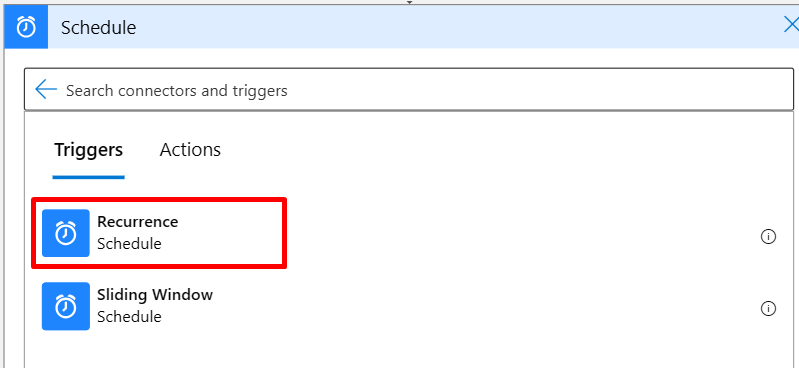
1. In my case Im taking the trigger point as Recurrence as it should process the files at time on each end of the day. you can also take when file is added.


2. Take the next step and add the scope. our operations will be go on inside the scope as we can determine the logic app run process weather it is failed succeed aborted.


3. Now take the List files in the folder step from SFTP-SSH, this action will retrieve all the files from the specified folder.


4. Now take a for_each loop which will loop the each file which we will get the list in the above step. Pass body of the above step as the input for the for each loop. Add the action Get files content to read the content of the file.


You can take the file content below.


4. Now pass the file content to D365 by using the recurring integration API.  To know more about the RI please visit y blog here.
5. To connect to the D365 we would required a Tenet ID, Client Id, Client secret for the authentication.
for this step I'm creating one more global logic app with HTTP trigger which is used to get trigger the file to D365. because we can not take the request action inside a for_each loop.
6. For the logic app am taking the inputs as below.
{
    "properties": {
        "Audience": {
            "type": "string"
        },
        "CSVInputRequest": {
            "type": "string"
        },
        "InputRequestType": {
            "type": "string"
        },
        "JsonInputRequest": {
            "type": "object"
        },
        "Method": {
            "type": "string"
        },
        "URI": {
            "type": "string"
        }
    },
    "required": [
        "URI"
    ],
    "type": "object"
}
7. with The above inputs we need to create a below step for the web request.


8. Now from the above step we will get the failure and success response as below. 

9. Now go to original app and call the above created logic app and pass the inputs as below.

10. From the above you will get the respose with a message ID. To get the processing status of message queue I have added the below step. take the delay of 3 mins.

11. Now take Until step to get any one of  status added in the condition.

@or(equals(body('GetMessageStatus')?['value'], 'Processed'),equals(body('GetMessageStatus')?['value'], 'ProcessedWithErrors'),equals(body('GetMessageStatus')?['value'], 'PostProcessingError'),equals(body('GetMessageStatus')?['value'], 'PreProcessingError'))


12. Now trigger the getMessagestatus API by using the above created gobal logic app.

13. if it is processed we need to move this to Archive file.


14. if the status other than this we need to move this to error folder.


Follow the process step by step for any host-to-host integration using Logic Apps. Feel free to share your suggestions.

Thanks !!


Upload / read files from the FTP server using X++

In the code below, we can see how files are transferred to an FTP server using X++.

Prerequisites :

FTP Address:  The address used to connect to the FTP server.  
Username:       The authorized username required for logging into the FTP server.  
Password:        The password needed to access the FTP.  
Folder paths:   The locations of folders where files can be placed or read.


    public void sendFileToFTP(System.IO.Stream  _stream)
    {
        System.Text.Encoding 		            getUTF8;
        System.Byte[] 			                bytes;
        System.Object 			                request,response,credential;
        System.Net.FtpWebRequest 	            ftpRequest;
        System.IO.Stream 		                requestStream;
        System.Net.FtpWebResponse 	            ftpResponse;
        System.IO.StreamReader 		            reader;
        System.Char[] 			                chars;
        Str1260 			                    ftpFileName =  "ftp://<Ipaddress>//INPUT/UNPROCESSED/ "+ filename ;  // folder paths
        
        try
        {
        _stream.Position = 0;
        // Encode
        reader 	= new System.IO.StreamReader(_stream);
        getUTF8 = System.Text.Encoding::get_UTF8();
        bytes 	= getUTF8.GetBytes(reader.ReadToEnd());
 
        // Creating request
        request 	= System.Net.WebRequest::Create(new System.Uri(ftpFileName));
        ftpRequest 	= request;
 
        // Creating credentials
        credential = new System.Net.NetworkCredential('UserName', 'Password');
 
        // assign parameters to reuest
        ftpRequest.set_Credentials(credential);
        ftpRequest.set_ContentLength(bytes.get_Length());
        ftpRequest.set_Method("STOR");
     
 
        // Write file to stream
        requestStream = ftpRequest.GetRequestStream();
        requestStream.Write(bytes,0,bytes.get_Length());
        requestStream.Close();
 
        // Get respose
        response = ftpRequest.GetResponse();
        ftpResponse = response;
        info('Uploded.');
        }
        catch
        {
            error("failed");
        }
    }
public static str readFileFromSFTP(FileName _fileName)
    {
        System.Object                   ftpo;
        System.Net.FtpWebRequest        request;
        System.IO.StreamReader          reader;
        System.Net.NetworkCredential    credential;
        System.Net.FtpWebResponse       response;
        Str1260                         text;
        UserId                          usernameFTP;
        Password                        password;
        Str1260                         readingPath;
 
        try
        {
            ttsbegin;
            password     = cryptoblob2str(WinAPIServer::cryptUnProtectData('password'));
            ftpo            = System.Net.WebRequest::Create(@'FolderpathtoReadFie' + @"/" + _fileName);
            request         = ftpo;
 
            credential      = new System.Net.NetworkCredential('UserName', password);
            request.set_Credentials(credential);

            response        = request.GetResponse();
            reader          = new System.IO.StreamReader(response.GetResponseStream());
            text            = reader.ReadToEnd();
            ttscommit;
        }
        catch
        {
            error("Error reading files");
        }
        return text;
   }

Keep Daxing !!

Create and Post Hour journals using X++

In this blog, we will explore how to create and post an hour journal using X++ code. I have taken examples from a staging table, where we can utilize the data to create hour journals using the following method.

  public boolean createHourJournal(DaxHourStaging stagingData)
  {
      ProjJournalTableData            JournalTableData;
      ProjJournalTransData            journalTransData;
      ProjJournalTable                journalTable, journalTableUpdate;
      ProjJournalTrans                journalTrans;
      ProjTable                       projTable;
      ProjInvoiceTable                projInvoiceTable;
      NumberSeq                       numberSeq;
      ProjJournalCheckPost            jourPost;
      ProjQtyEmpl                     qty;
      JournalNumOfLines               numOfLines;
      DataAreaId                      company = '';
      journalNum = '';
      DaxHourStaging  stagingDataHour;
      boolean ret = false;

      while select stagingDataHour
          where stagingDataHour.InvoiceNumber == stagingData.InvoiceNumber
              && stagingDataHour.TransID == stagingData.TransID
              && stagingDataHour.TransactionType == DAXTransactionType::Hour
              && stagingDataHour.DAXProcessedUnprocessed == DAXProcessedUnprocessed::UnProcessed
              && stagingDataHour.Type == DAXType::Invoice
      {
          select crosscompany projTable
              where projTable.DAXTransID == stagingDataHour.TransID;

          changecompany(projTable.DataAreaId)
          {
              company = projTable.DataAreaId;
              if (!journalNum)
              {
                  journalTableData = JournalTableData::newTable(journalTable);
                  journalTransData = journalTableData.journalStatic().newJournalTransData(journalTrans, journalTableData);
                  journalTable.clear();
                  journalTable.JournalId      = journalTableData.nextJournalId();
                  journalTable.JournalType    = ProjJournalType::Hour;
                  journalTable.JournalNameId  = ProjParameters::find().EmplJournalNameId;
                  journalTable.initFromProjJournalName(ProjJournalName::find(journalTable.JournalNameId));
                  journalTable.insert();
                  journalNum = journalTable.JournalId;
              }
              ResourceView            ResResourcesListView;
              ResResourceIdentifier   ResResourceIdentifier;
              ResourceCategoryView    ResourceCategoryView;
              WrkCtrTable             wrkctrTable;
              str                     resourceId = '';
              str                     resourceCompany = '';
              HcmWorker               hcmWorker;
              HcmEmployment           hcmEmployment;
              utcdatetime             now = DateTimeUtil::utcNow();
              CompanyInfo             companyInfo;

              select firstonly ResResourcesListView
                  where ResResourcesListView.ResourceId == stagingDataHour.DAXologyResourceId
                      && ResResourcesListView.ResourceCompanyId == projTable.DataAreaId;

              if (!ResResourcesListView.RecId)
              {
                  select ValidTimeState(now) hcmEmployment
                      join hcmWorker
                      where hcmWorker.RecId == hcmEmployment.Worker
                          && hcmWorker.PersonnelNumber == stagingDataHour.DAXologyResourceId
                      join companyInfo where companyInfo.RecId == hcmEmployment.LegalEntity;

                  if (hcmWorker.RecId)
                  {
                      resourceId      = hcmWorker.PersonnelNumber;
                      resourceCompany = companyInfo.DataArea;
                  }
              }
              select firstonly ResResourceIdentifier
                  where ResResourceIdentifier.RecId == ResResourcesListView.RecId;

              journalTableData.initFromJournalName(journalTableData.journalStatic().findJournalName(ProjJournalTable::find(journalNum).JournalNameId));
              journalTrans.clear();
              journalTransData.initFromJournalTable();

              projInvoiceTable    = projTable.projInvoice();
              journalTrans.setTransDate();
              journalTrans.TransDate          = stagingDataHour.TransDate;
              journalTrans.ProjTransDate      = stagingDataHour.TransDate;
              journalTrans.ProjId             = projTable.ProjId;
              journalTrans.Qty                = stagingDataHour.Quantity;
              journalTrans.DAXInvoiceId      = stagingDataHour.InvoiceNumber;
              journalTrans.DAXInvoiceDate    = stagingDataHour.InvoiceDate;
              journalTrans.DAXTransactionId  = stagingDataHour.TransactionId;
              journalTrans.CategoryId         = ProjParameters::find().EmplCategory;
              // journalTrans.Resource           = ResResourceIdentifier.RefRecId;
              journalTrans.Worker             = ResResourcesListView.Worker;
              journalTrans.LinePropertyId     = 'Chargeable';
              //journalTrans.DAXResourceCompany = resourceCompany;
              journalTrans.DAXWrkCtrId       = stagingDataHour.DAXologyResourceId;
              journalTrans.DAXResourceName   = stagingDataHour.DAXologyResourceName;
              journalTrans.DAXologyRoleName  = stagingDataHour.DAXologyRoleName;
              journalTrans.Txt                = stagingDataHour.Description;
              journalTrans.CurrencyId         = projInvoiceTable.CurrencyId;
              journalTrans.DefaultDimension   = projTable.DefaultDimension;
              journalTrans.TaxGroupId         = ProjParameters::taxGroupInvoice(projTable.ProjId);
              journalTrans.SalesPrice         = stagingDataHour.SalesPrice;
              InventTableModule   inventTableModule;

              select inventTableModule
                  where inventTableModule.ItemId == InventTable::find(DAX_ProjectHourJournalCreateService::getDimensionValueFromDefaultDimension(projTable.DefaultDimension)).ItemId
                      && inventTableModule.ModuleType == ModuleInventPurchSales::Sales;

              journalTrans.TaxItemGroupId     = inventTableModule.TaxItemGroupId;
              numberSeq = NumberSeq::newGetVoucherFromId(journalTable.VoucherNumberSequenceTable, false);

              journalTrans.Voucher            = numberSeq.voucher();
              journalTransData.create();
              if (TaxParameters::checkTaxParameters_IN())
              {
                  ProjJournalTransTaxExtensionIN     projJournalTransHourTaxExtensionIN = null;
                  projJournalTransHourTaxExtensionIN  = ProjJournalTransTaxExtensionIN::findByProjJournalTrans(journalTrans.RecId);
                  if (!projJournalTransHourTaxExtensionIN.RecId)
                  {
                      projJournalTransHourTaxExtensionIN.initValue();
                      projJournalTransHourTaxExtensionIN.ProjJournalTrans = journalTrans.RecId;
                      projJournalTransHourTaxExtensionIN.AssessableValueTransactionCurrency = journalTrans.Qty * journalTrans.SalesPrice;
                      projJournalTransHourTaxExtensionIN.insert();
                  }
              }
          }

      }
      try
      {
          changecompany(projTable.DataAreaId)
          {
              if (journalNum)
              {
                  jourPost = ProjJournalCheckPost::newJournalCheckPost(true,true,JournalCheckPostType::Post,tableNum(ProjJournalTable), journalNum);
                  jourPost.run();
                  ret = true;
                  ProjJournalTrans                projJournalTrans;
                  ProjJournalTable                projJournalTabeUpd;

                  projJournalTabeUpd = ProjJournalTable::find(journalNum,true);

                  select count(RecId), sum(Qty) from projJournalTrans
                              where projJournalTrans.JournalId == journalNum;

                  projJournalTabeUpd.NumOfLines = int642int(projJournalTrans.RecId);
                  projJournalTabeUpd.ProjQty = projJournalTrans.Qty;
                  projJournalTabeUpd.update();

                  DaxHourStaging  stagingGlobalUpd;
                  update_recordset stagingGlobalUpd setting DAXProcessedUnprocessed = DAXProcessedUnprocessed::Processed
                          where stagingGlobalUpd.InvoiceNumber == stagingData.InvoiceNumber
                              && stagingGlobalUpd.OrderItemId  == stagingData.OrderItemId
                              && stagingGlobalUpd.TransactionType == DAXTransactionType::Hour;

              }
          }
      }
      catch
      {
          //Posting exception
      }
      finally
      {
          // Can go with an final update here
      }
      return ret;
  }
Thanks !!

Create and Post Pending vendor invoice using X++


The class below will be used to create and post pending vendor invoices along with the project information. In my case, I retrieved the data from a staging table and created the pending vendor invoices.

public class CreatePendingVendorInvoice
{
    VendInvoiceInfoTable    vendInvoiceInfoTable;
    ProjParameters          projParameters;
    str                     ItemCompany;
    str                     ItemProjId;
    RecId                   ItemProjDimension;

    /// <summary>
    /// This method will be used to create the Pending vendor invoice header
    /// </summary>
    /// <param name = "_stagingTrans"></param>
    public void createPendingVendorInvoiceHeader(DaxStagingTrans    _stagingTrans)
    {
        projParameters = ProjParameters::find();

        NumberSeq   numberSeq = NumberSeq::newGetNum(ProjParameters::invoiceId());

        vendInvoiceInfoTable.clear();
        vendInvoiceInfoTable.initValue();

        vendInvoiceInfoTable.DocumentOrigin          = DocumentOrigin::Manual;
        vendInvoiceInfoTable.InvoiceAccount          = this.getVendorAccount();
        vendInvoiceInfoTable.defaultRow(null, null, true);

        vendInvoiceInfoTable.Num                     = numberSeq.num();
        vendInvoiceInfoTable.VendInvoiceSaveStatus   = VendInvoiceSaveStatus::Pending;
        vendInvoiceInfoTable.DocumentDate            = _stagingTrans.JournalDate;
        vendInvoiceInfoTable.ReceivedDate            = _stagingTrans.JournalDate;
        vendInvoiceInfoTable.TransDate               = _stagingTrans.JournalDate;
        vendInvoiceInfoTable.LastMatchVariance       = LastMatchVarianceOptions::OK;
        vendInvoiceInfoTable.RequestStatus           = VendInvoiceRequestStatus::Approved;
        vendInvoiceInfoTable.insert();

        this.createPendingVendorInvoiceLine(_stagingTrans);
    }

    /// <summary>
    /// This method used to create the Pending Vendor incvoice lines
    /// </summary>
    /// <param name = "_stagingTrans">DaxStagingTrans</param>
    public void createPendingVendorInvoiceLine(DaxStagingTrans    _stagingTrans)
    {
        VendInvoiceInfoLine     vendInvoiceInfoLine;

        vendInvoiceInfoLine.clear();
        vendInvoiceInfoLine.initValue();
        vendInvoiceInfoLine.DeliveryName        = vendInvoiceInfoTable.DeliveryName;
        vendInvoiceInfoLine.TableRefId          = vendInvoiceInfoTable.TableRefId;
        vendInvoiceInfoLine.currencyCode        = vendInvoiceInfoTable.CurrencyCode;
        vendInvoiceInfoLine.LineNum             = 1;
        vendInvoiceInfoLine.InvoiceAccount      = vendInvoiceInfoTable.InvoiceAccount;
        vendInvoiceInfoLine.OrderAccount        = vendInvoiceInfoTable.OrderAccount;
        vendInvoiceInfoLine.ProcurementCategory = projParameters.ANTHProcurCategory;
        vendInvoiceInfoLine.modifiedField(fieldNum(VendInvoiceInfoLine, ProcurementCategory));
        vendInvoiceInfoLine.ReceiveNow          = 1;
        vendInvoiceInfoLine.PurchUnit           = projParameters.ANTHPurchUnit;
        vendInvoiceInfoLine.DocumentOrigin      = DocumentOrigin::Manual;

        container           conAttribute            = ANTHConcurCreateGeneralJournalService::getFDFromParameters();
        container           convalue                = this.getProjectDimensions(conAttribute, _stagingTrans);

        vendInvoiceInfoLine.DefaultDimension    = ANTHConcurCreateGeneralJournalService::createDefaultDimension(conAttribute, convalue);
        vendInvoiceInfoLine.insert();

        if (vendInvoiceInfoLine)
        {
            VendInvoiceInfoLine_Project   vendInvoiceInfoLine_Project;

            vendInvoiceInfoLine_Project.VendInvoiceInfoLineRefRecId = vendInvoiceInfoLine.RecId;
            vendInvoiceInfoLine_Project.ProjDataAreaId              = ItemCompany;
            vendInvoiceInfoLine_Project.ProjId                      = ItemProjId;
            vendInvoiceInfoLine_Project.ProjCategoryId              = _stagingTrans.Expensecategory;
            vendInvoiceInfoLine_Project.ProjLinePropertyId          = CreatePendingVendorInvoice::findLineProperty();
            vendInvoiceInfoLine_Project.TransDate                   = _stagingTrans.JournalDate;
            vendInvoiceInfoLine_Project.ProjSalesUnitId             = UnitOfMeasure::findBySymbol(projParameters.ANTHPurchUnit).RecId;
            vendInvoiceInfoLine_Project.ProjSalesCurrencyId         = _stagingTrans.Currency;
            vendInvoiceInfoLine_Project.TransferCurrency            = _stagingTrans.Currency;
            vendInvoiceInfoLine_Project.TransferPrice               = _stagingTrans.Costamount;
            vendInvoiceInfoLine_Project.ANTHConcurTransactionID     = _stagingTrans.ConcurTransactionID;
            vendInvoiceInfoLine_Project.ProjTaxGroupId              = '';
            vendInvoiceInfoLine_Project.ProjTaxItemGroupId          = '';
            vendInvoiceInfoLine_Project.insert();
        }
    }

    /// <summary>
    /// This method used to Post the Vendor invoice
    /// </summary>
    public void postInvoice()
    {
        PurchFormLetter         purchFormLetter;

        purchFormLetter = PurchFormLetter_Invoice::newFromSavedInvoice(vendInvoiceInfoTable);
        purchFormLetter.purchParmUpdate(null);
        purchFormLetter.parmId('');
        purchFormLetter.initNewPurchParmUpdate();
        purchFormLetter.proforma(false);
        purchFormLetter.reArrangeNow(false);

        purchFormLetter.update(vendInvoiceInfoTable,
                                vendInvoiceInfoTable.Num,
                                purchFormLetter.transDate(),
                                PurchUpdate::All,
                                AccountOrder::None,
                                purchFormLetter.proforma(),
                                purchFormLetter.printFormLetter(),
                                false,
                                purchFormLetter.creditRemaining(),
                                conNull(),
                                true);

    }

    /// <summary>
    /// This method used to retrieve the Default Dimensions
    /// </summary>
    /// <param name = "_attribute">Container</param>
    /// <param name = "_stagingTrans">DaxStagingTrans</param>
    /// <returns>Container</returns>
    private container getProjectDimensions(container    _attribute, DaxStagingTrans _stagingTrans)
    {
        // DeptCC-ProfitCenter-PRODGRP-UnifiedProductID-Customer-Vendor
        return [_stagingTrans.Costcenter, projParameters.DAXProfitCenter,
                CreatePendingVendorInvoice::getDimensionValue(orderItemProjDimension, conPeek(_attribute, 3)),
                CreatePendingVendorInvoice::getDimensionValue(orderItemProjDimension, conPeek(_attribute, 4)),
                CreatePendingVendorInvoice::getDimensionValue(orderItemProjDimension, conPeek(_attribute, 5))];
    }

    /// <summary>
    /// Gets the display value from the Dimension Recid
    /// </summary>
    /// <param name = "_dimension">RecId</param>
    /// <param name = "_dimensionName">Str</param>
    /// <returns>DimensionValue</returns>
    public static DimensionValue getDimensionValue(RecId  _dimension, str _dimensionName)
    {
        DimensionAttributeValueSetStorage   dimensionAttributeValueSetStorage ;
        DimensionAttribute                  dimensionAttribute;
        DimensionValue                      dimensionValue;

        dimensionAttributeValueSetStorage = dimensionAttributeValueSetStorage::find(_dimension);

        dimensionAttribute  = dimensionAttribute::findbyname(_dimensionName);
        dimensionValue      = dimensionAttributeValueSetStorage.getDisplayValueByDimensionAttribute(dimensionAttribute.recId);

        return dimensionValue;
    }

    public void OrderDetails(container  _OrderCon)
    {
        [orderItemCompany, orderItemProjId, orderItemProjDimension] = _OrderCon;
    }

    public str getVendorAccount()
    {
        DirPartyView    partyView;
        DirPartyRecId   partyId = CompanyInfo::findDataArea(orderItemCompany).RecId;

        select firstonly AccountNum from partyView
            where partyView.Party == partyId && partyView.RoleType == DirPartyRoleType::Vendor && partyView.DataArea == curExt();

        return partyView.AccountNum;
    }

    public static CreatePendingVendorInvoice construct(container  _OrderCon)
    {
        CreatePendingVendorInvoice    concurCreatePendingVendorInvoice = new CreatePendingVendorInvoice();

        concurCreatePendingVendorInvoice.OrderDetails(_OrderCon);

        return concurCreatePendingVendorInvoice;
    }

    public static str findLineProperty()
    {
        ProjLineProperty    projLineProperty;

        select firstonly LinePropertyId from projLineProperty
            where projLineProperty.ToBeInvoiced == false;

        return projLineProperty.LinePropertyId;
    }

    public static ResourceView findResource(str _resourceId)
    {
        ResourceView resource;

        select firstonly resource
            where resource.ResourceId == _resourceId;

        return resource;
    }

}

Thanks !!